ToxicPanda Android Malware Abuses VPN Permissions to Block Google Play and Steal Banking Credentials
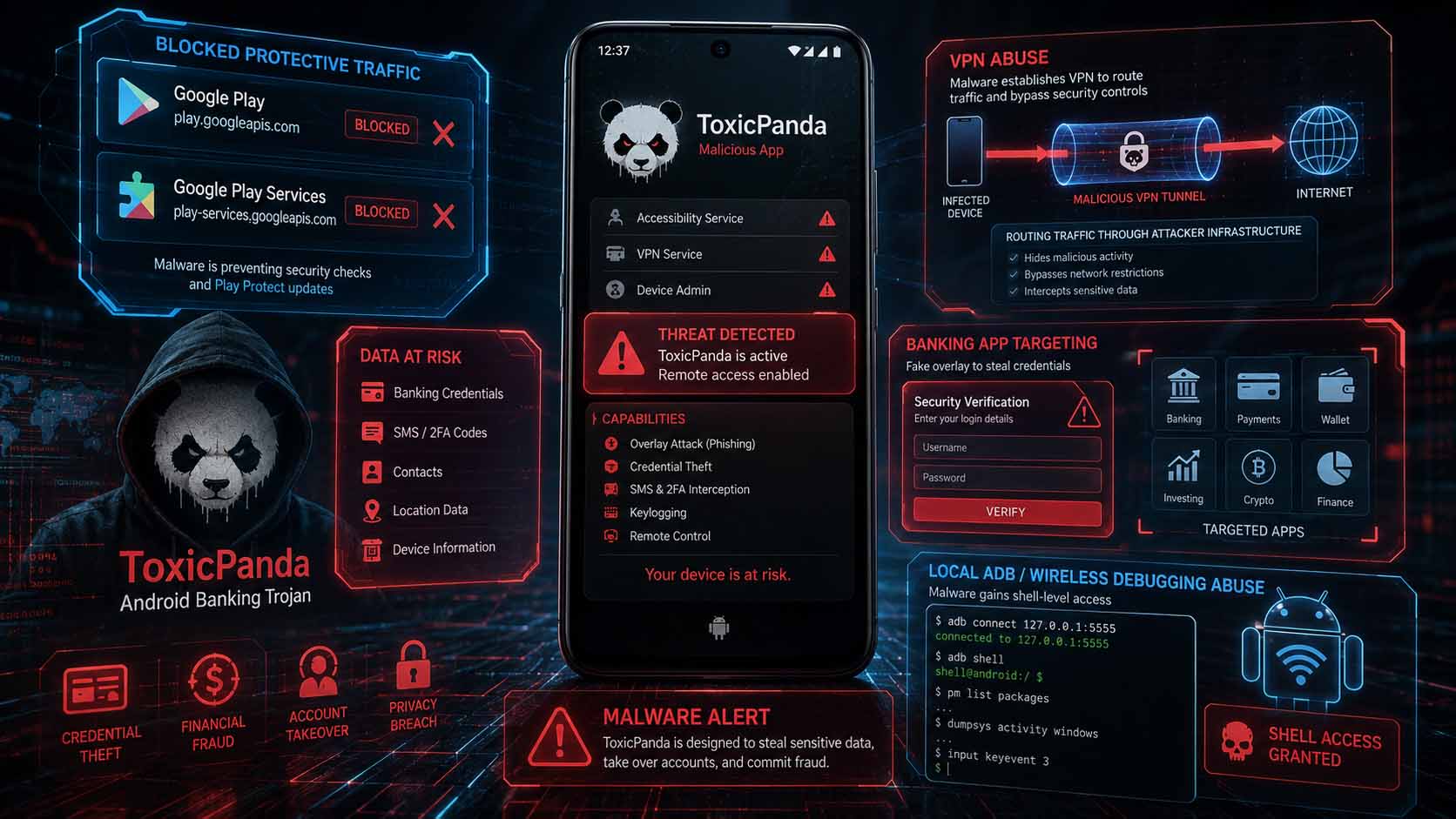
A new version of the ToxicPanda Android banking malware abuses VPN permissions to block communications with Google Play and Google Play Services, potentially interfering with security checks and Play Protect. ToxicPanda 2.0 now supports 167 remote commands, targets 349 banking and cryptocurrency applications across 16 countries, and can abuse Wireless ADB to gain shell-level access on infected devices.
Cybersecurity researchers have uncovered a significantly upgraded version of the ToxicPanda Android banking malware, which introduces new techniques designed to weaken Android security protections and maintain persistent control over infected devices.
The latest version, referred to as ToxicPanda 2.0, abuses Android's VPN functionality to create a local network interface that allows the malware to manipulate traffic generated by the device.
One of its primary goals is to block communications between the infected smartphone and Google Play or Google Play Services. This may interfere with application verification, security updates, Play Protect communication, and other defensive actions that Google could use to detect or disrupt malicious applications.
ToxicPanda Uses VPN Permissions as a Security Evasion Technique
Legitimate VPN applications use Android's VpnService functionality to route device traffic through a secure tunnel.
ToxicPanda weaponizes the same capability.
After requesting VPN service permission, the malware creates a local network interface and gains control over selected traffic passing through the device.
It can then block communications associated with Google Play and Google Play Services before extracting and installing additional malicious components.
After that stage, ToxicPanda requests access to Android's Accessibility Service, which provides even greater control over the device.
Google's official developer policies restrict the use of VpnService and require legitimate applications using it to clearly disclose the feature and follow applicable privacy and security requirements.
349 Financial and Cryptocurrency Apps Targeted
ToxicPanda 2.0 has significantly expanded its list of targets.
Researchers identified phishing overlays targeting 349 banking, financial, cryptocurrency, and electronic wallet applications across 16 countries.
Overlay attacks work by displaying a malicious interface over a legitimate application.
For example, when a victim opens a banking app, malware can display a fake login interface that visually resembles the real application.
Credentials entered into the fake interface can then be sent to the attacker.
ToxicPanda's overlay mechanisms can also capture touch interactions with targeted applications.
Dedicated PIN-Stealing Module Targets 140 Apps
In addition to traditional credential theft, ToxicPanda contains a separate module designed to capture authentication secrets.
Researchers say the module targets approximately 140 financial and cryptocurrency applications and can dynamically update its target list.
The malware can also imitate the Android lock screen in an attempt to steal:
- Device PIN codes
- Unlock patterns
- Passwords
Obtaining a device unlock credential can significantly increase the attacker's ability to perform fraud because many financial apps rely on the phone's existing device authentication mechanisms.
Fake System Updates Hide Malicious Activity
Some ToxicPanda samples also display fake Android system-update screens.
While users believe their phone is installing or processing an update, the malware can perform malicious activity in the background.
This is an effective social-engineering technique because users generally expect system updates to temporarily interrupt normal smartphone use.
A full-screen update interface can therefore disguise unusual delays, background activity, or permission changes.
ToxicPanda Abuses Wireless ADB
One of the most technically significant capabilities in ToxicPanda 2.0 is its automated abuse of Android Debug Bridge (ADB).
ADB is a legitimate developer tool used to communicate with Android devices and execute shell commands.
Wireless debugging, introduced in Android 11, allows ADB connections over Wi-Fi without requiring a USB cable.
ToxicPanda combines Accessibility Service privileges with Wireless ADB to automate this process.
According to researchers, the malware can:
- Open Android Developer Options
- Enable Wireless Debugging
- Retrieve the six-digit ADB pairing code
- Identify the required network port
- Connect to the local ADB service
- Obtain shell-level command execution
This gives ToxicPanda access to capabilities normally intended for developers.
Shell Access Expands Malware Capabilities
Once ToxicPanda gains shell-level access through ADB, it can execute privileged commands through the Android debugging daemon.
This can allow the malware to bypass some standard Android permission workflows and modify system behavior more aggressively.
Researchers report that ToxicPanda can use this access to:
- Grant additional permissions
- Reduce operating-system restrictions
- Enable malicious components
- Improve persistence
- Interfere with background-process limitations
- Execute shell commands
The abuse of Wireless ADB is especially concerning because other Android malware families have also started adopting similar techniques.
This suggests that ADB automation may become an increasingly common privilege-escalation method in mobile malware.
167 Remote Commands Supported
ToxicPanda 2.0 now supports 167 different commands that can be sent remotely by attackers.
This turns the malware into more than a simple credential stealer.
With a large remote command set, attackers may be able to control numerous aspects of an infected smartphone and adapt their actions depending on the target.
Combined with VPN manipulation, Accessibility Service permissions, ADB shell access, overlays, and credential harvesting, the malware effectively provides a broad remote-control framework.
Persistence on Xiaomi, Samsung, Huawei and Other Devices
Android manufacturers often implement battery-optimization features that terminate applications running excessively in the background.
These features can disrupt malware persistence.
ToxicPanda contains a command known as autoBoot that detects the smartphone manufacturer and opens vendor-specific autostart or power-management settings.
Researchers observed support for devices from manufacturers including:
- Xiaomi
- OPPO
- Vivo
- Samsung
- Huawei
The malware can then attempt to configure itself so that operating-system power-management protections are less likely to terminate its background processes.
Malware Distributed Through AWS Infrastructure
Researchers report that ToxicPanda 2.0 samples are being distributed through Amazon AWS-hosted buckets.
The use of legitimate cloud infrastructure is common in modern malware campaigns.
Attackers benefit from:
- Reliable hosting
- HTTPS support
- High availability
- Globally distributed infrastructure
- Trusted domain reputation
This can make malicious downloads more difficult to distinguish from legitimate cloud-hosted content.
However, the presence of a file on a major cloud platform does not mean that the file itself is trustworthy.
Why ToxicPanda Is Dangerous
ToxicPanda combines several techniques that individually represent serious security risks.
Together, they create a sophisticated mobile attack chain:
VPN abuse
Attempts to interfere with Google security services.
Accessibility Service abuse
Allows automated interaction with Android interfaces.
Wireless ADB abuse
Provides shell-level access.
Overlay attacks
Steal credentials from banking and cryptocurrency applications.
Lock-screen phishing
Attempts to steal device PINs and passwords.
Persistence techniques
Help the malware remain active despite vendor battery controls.
Remote commands
Give attackers extensive control over infected devices.
This combination makes ToxicPanda significantly more capable than a traditional Android banking Trojan focused solely on stealing usernames and passwords.
How Android Users Can Protect Themselves
Users should take several precautions against Android banking malware.
Recommended measures include:
- Install applications only from trusted sources.
- Avoid APK files received through messaging apps, advertisements, or unknown websites.
- Be cautious when an unfamiliar app requests VPN permission.
- Treat Accessibility Service requests as highly sensitive.
- Do not enable Developer Options or Wireless Debugging unless necessary.
- Disable Wireless Debugging when development work is complete.
- Keep Android and Google Play Services updated.
- Keep Google Play Protect enabled.
- Review applications with Accessibility permissions regularly.
- Review installed VPN profiles and remove unknown ones.
- Enable multi-factor authentication for financial services where available.
- Never enter banking credentials into unexpected login screens.
If a suspicious application has already been given VPN, Accessibility, or Wireless Debugging permissions, the device should be treated as potentially compromised until investigated.
Analysis and context
ToxicPanda 2.0 highlights an important evolution in Android malware.
Attackers are increasingly moving away from relying on a single dangerous permission.
Instead, malware chains together several legitimate Android capabilities and turns them into a complete attack framework.
Legitimate Features Become Attack Primitives
VPN services, Accessibility Services, and ADB are not vulnerabilities.
They are legitimate Android features.
The problem arises when malware convinces a user to provide access to them.
This distinction is important.
Traditional vulnerability management focuses heavily on patching software flaws.
But ToxicPanda demonstrates that attackers can gain significant control without requiring a traditional zero-day vulnerability.
The operating system may function exactly as designed.
The attacker simply abuses trusted functionality.
VPN Permissions Are Especially Powerful
VPN permissions deserve particular attention because network control operates at a different layer than many ordinary Android permissions.
A malicious application with control over device networking can potentially influence whether other applications successfully communicate with remote services.
In ToxicPanda's case, the malware reportedly blocks traffic associated with Google Play and Google Play Services.
This is important because security systems increasingly depend on continuous communication with cloud infrastructure.
If malware can selectively disrupt those communications, it may create an environment in which security controls become partially isolated from their backend services.
Accessibility Remains a Major Android Security Problem
Accessibility Services were originally designed to help users with disabilities interact with applications.
Unfortunately, the same capabilities can be extremely valuable to malware.
With sufficient Accessibility permissions, malicious software can potentially:
- Read interface content
- Press buttons
- Navigate menus
- Approve dialogs
- Capture interactions
- Automate configuration changes
ToxicPanda demonstrates how Accessibility permissions can serve as a bridge to even more powerful capabilities such as Wireless ADB.
Wireless ADB Abuse Raises the Stakes
Wireless ADB is perhaps the most concerning component of this campaign.
Normally, Android's permission model restricts what an individual application can do.
ADB shell access changes that equation.
Once malware reaches the shell environment, it may gain access to commands that are unavailable to ordinary applications.
This creates an escalation path:
Malicious app
→ Accessibility Service
→ Developer Options
→ Wireless Debugging
→ ADB pairing
→ Shell access
The result is not a classic software vulnerability.
It is a chain of legitimate capabilities being manipulated by malicious automation.
Mobile Security Needs Behavioral Detection
ToxicPanda also illustrates why signature-based malware detection alone is insufficient.
A modern mobile security system should monitor suspicious combinations of behaviors, such as:
- An unknown application requesting VPN access
- Followed by Accessibility permissions
- Followed by enabling Developer Options
- Followed by Wireless Debugging activity
- Followed by connections to local ADB services
- Followed by overlay creation against financial apps
Any individual action may have legitimate uses.
The combination is far more suspicious.
This is why behavioral detection is becoming increasingly important in mobile endpoint security.
Banking Malware Is Becoming Full Remote Access Malware
Traditional banking Trojans primarily focused on stealing login credentials.
Modern families such as ToxicPanda increasingly provide functionality closer to a remote administration framework.
With 167 remote commands, shell access, overlay capabilities, PIN theft, network manipulation, and persistence, attackers may potentially control many aspects of the victim device.
This is particularly dangerous in financial fraud.
Modern banks increasingly use smartphones themselves as authentication factors.
If attackers compromise the phone, they may potentially obtain access to:
- Credentials
- Device PINs
- Authentication sessions
- Notifications
- Banking applications
- Transaction confirmation flows
The same device intended to provide additional security can therefore become the attacker's primary target.
The Broader Security Lesson
ToxicPanda demonstrates that mobile security is increasingly about protecting trust relationships rather than simply preventing malware installation.
Android trusts VPN applications to manage traffic.
It trusts Accessibility Services to interact with user interfaces.
It trusts ADB to provide developers with powerful debugging capabilities.
Attackers attempt to inherit those same privileges.
The most important defensive principle is therefore:
Permissions should be treated as security boundaries, not routine installation prompts.
Users should carefully question any application requesting VPN access, Accessibility Services, device administration, notification access, or debugging-related privileges unless those permissions are essential to the application's legitimate purpose.